




Best practices in Research Software
General context
In recent years, scientific research has become more data driven and data intensive and it is no longer possible to carry out the analysis without the use of computers and research software. Unfortunately, software is not always developed following best practices that ensure its quality and sustainability.
Four simple recommendations to encourage best practices in open research software is a publication that addresses this issue by providing a simple, yet robust framework of recommendations that encourage the adoption of existing best practices in research software development. These recommendations are designed around Open Science values, and provide practical suggestions that contribute to making research software and its source code more discoverable, reusable and transparent.
These recommendations recognise that not everyone can or want to make their software open from day one, but we encourage you to learn from the recommendations and adapt them to your needs. For example, you can have a private repository, you can and should still have a license, make contributions clear, and have a registry of your software.
The course is aimed at graduate students and researchers, who have or will have in the near future code to share or want to collaborate with open source software. For this workshop we recommend you to be familiar with (at least) one programming language, Markdown and GitHub. This workshop will not teach you how to program, nor will you need to program during the workshop.
To participate this workshop, you will need working copies of the software described below. Please make sure to install everything and try opening it to make sure it works before the start of your workshop. If you run into any problems, please feel free to email the instructor or arrive early to your workshop on the day. Participants should bring and use their own laptops to insure the proper setup of tools for an efficient workflow once you leave the workshop.
Platform-specific Notes
This workshop will be using the software outlined in the install instructions below. Please see the section for your operating system for those directions.
Windows
Please go through all the installation steps below and make sure that you not only installed them, but start them up to make sure they're working. If you have any problems, don't hesitate to email the instructors to ask for help, or arrive early on the first day of the workshop to get help.
Mac
Please go through all the installation steps below and make sure that you not only installed them, but start them up to make sure they're working. If you have any problems, don't hesitate to email the instructors to ask for help, or arrive early on the first day of the workshop to get help.
Linux
Please go through all the installation steps below and make sure that you not only installed them, but start them up to make sure they're working. If you have any problems, don't hesitate to email the instructors to ask for help, or arrive early on the first day of the workshop to get help.
Trainers
Mateusz Kuzak
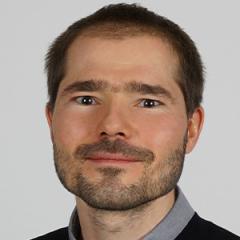
Mateusz Kuzak is a scientific community manager at the Dutch Techcentre for Life Sciences, where he works at the interface of training, technology, and data platforms and the research community in the Netherlands.
Toby Hodges
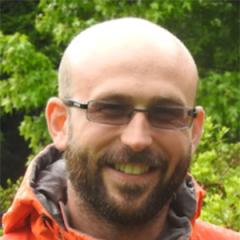
Toby Hodges is a bioinformatician turned community coordinator, working on the Bio-IT Project at EMBL in Heidelberg, Germany.
Practical info


Ghent - Clemenspoort
Overwale 3
9000 Ghent
Belgium
Ghent - Clemenspoort
The Clemenspoort, the Clemenshuis, and the Clemenshof are integrated into a network of other buildings on the grounds of the former Redemptorist monastery, now the Overwale street.
Located just 250 meters from Ghent St. Pieters Station.
Ghent - Clemenspoort
40 bike parking lots available.
Ghent - Clemenspoort
Parking facilities available (€ 1.80 per hour). GPS address: Sint-Denijslaan 251. Take the driveway of the HoGent Sports Hall (not the HoGent Campus) and drive all the way to the end - past the HoGent parking areas. If you are registered in the 411 app, activate your license plate under the option 'Garage parking via license plate'. The barrier will open automatically, and payment will be processed via 4411.
Ghent - Clemenspoort
+32 476 46 10 40